

BAS night, minus the spreadsheet.

Log your Uber fares and car costs on your phone, see your GST for the quarter, and hand your accountant one tidy pack.

Start free

Free covers manual income and expenses. Pro is $10/mo and you can cancel anytime.
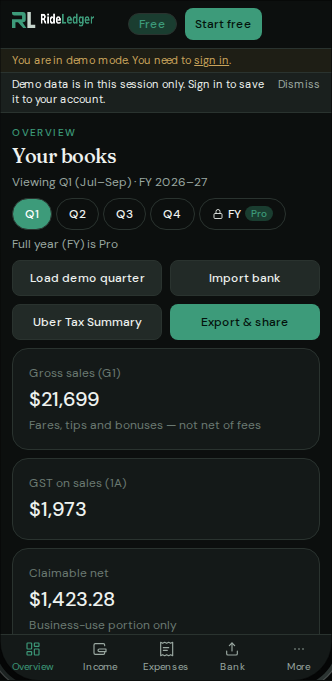
  1. 1Add the quarter
  2. 2Review GST
  3. 3Export for your agentPro

Free

$0

Track it yourself, free

  • Type in your fares and costs
  • Logbook and business-use %
  • Basic GST totals for this quarter
Start free

Pro

Recommended

$10/month, cancel anytime

Import, check, hand to your accountant

  • Drop in your bank or Uber files, and duplicates are skipped
  • Scan receipts (JPG or PDF): review fields, pick category, Confirm; originals stored privately
  • The full financial year and more than one car
  • BAS Statement worksheets and the accountant pack (ZIP, CSV, report, GST worksheet)
Go Pro

Pro adds its own subscription to your expenses automatically.

Compare every feature

Free

$0

Manual income and expenses — current quarter

History

  • Limited history
  • One vehicle
  • Manual income & expense entry
  • Logbook
  • Auto Pro expense on signup

Uploads

  • Upload to import data
  • Source documents stored
  • Unlimited bank Keep/Skip

Reports

  • GST overview
  • Accountant exports

Pro — $10/month · Recommended

$10/month

Pro $10/mo · Cancel anytime

  • When you go Pro, a recurring expense for Pro is added automatically

History

  • Full financial year
  • Multi-vehicle
  • Manual income & expense entry
  • Logbook
  • Recurring expenses

Uploads

  • Source documents stored (statements, receipts, logbook)
  • Unlimited bank CSV/PDF Keep/Skip — duplicates skipped
  • Scan receipts (JPG or PDF) — review fields, pick category, Confirm

Reports

  • BAS Statement worksheets
  • Accountant pack
Go Pro

Your quarter, step by step

One quarter, four stages. Start free and add Pro when you want imports and the pack.

  1. 1

    Week 1 onward

    Add as you drive

    Log fares and car costs on your phone after each shift.

    Start free
  2. 2

    Every week

    Import your bank or Uber filePro

    Drop in the file; Keep or Skip each line.

    Start free
  3. 3

    Before quarter end

    Check the quarter

    Review GST on sales and credits for the period.

    Start free
  4. 4

    After quarter end

    Hand the accountant pack overPro

    One ZIP for your registered agent.

    Start free
Private account

Your RideLedger data lives in a private account

Income and expenses live on the signed-in RideLedger account — not left in this browser. File import is Pro. Free is manual income and expenses. Pro stores originals privately (Australia region when the provider allows), encrypted with AES-256 at rest. Downloads require a session. Public blob URLs are never published.